


Dock
It grows as you glide.
A real Dash-to-Dock fork with hover magnification, a bounce when apps launch, and a genie effect when windows minimize.
A real dock, a global menu bar, traffic-light windows and shortcuts right where your hands expect them. Comfortable the moment you log in, and open all the way down.

 ParcherFileEditViewGoWindowHelp
A real Dash-to-Dock fork with hover magnification, a bounce when apps launch, and a genie effect when windows minimize.
Show Apps opens a full-screen launcher over your blurred desktop. Type to search, swipe through pages, drag icons into place, and drop one app on another to make a folder.
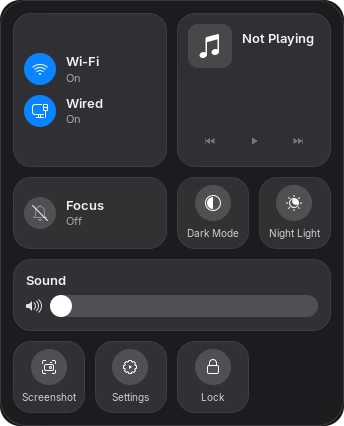
Wi-Fi, Bluetooth, Focus, Dark Mode, Night Light, brightness, sound and whatever's playing, in one tiled panel that opens from the top bar.

File, Edit, View, Window and Help for whatever app you're using, always at the top of the screen. The passion fruit holds Settings, Lock, Log Out and Shut Down.
Close, minimize and maximize sit on the left of every title bar, in the order your muscle memory expects.
The ParchaOS file manager is a real patched fork of GNOME Files, not a reskin, with color tags for your folders.
Genuine light and dark themes for apps, the shell and icons, switching on a schedule or automatically at sunrise and sunset.
The Super key takes over Ctrl's job, so copy, paste and every other shortcut work the way your muscle memory expects. Built on xremap.
Icons on your desktop. Files and folders live right on the desktop background, powered by Desktop Icons NG.
Live wallpaper. Set a video as your wallpaper with Hanabi, which stays off until you pick one.
Banners from the top right. Notifications slide in from the right-hand corner instead of dropping from the middle.
Shake to find your cursor. Lost the pointer? Give the mouse a shake and it grows until you spot it.
A focus schedule. Do Not Disturb turns on for the night by itself, at the times you pick, and never undoes Do Not Disturb you set yourself.
Ads blocked system-wide. hBlock keeps a hosts-file blocklist up to date with a daily refresh, for every app at once. Your own hosts entries stay, and any site can be allowed.
Parcha Browser. A Chromium-based browser, set as the default for web links, with full compatibility for Google services and everything else.
Parcha Store. Browse, install and update apps from one place.
Apps with plain names. The image viewer is Preview. Clocks is Clock. Geary is Mail. Names that tell you what the app does.
A calmer shell. Blur behind panels, and an Overview that keeps its search box out of the way until you start typing.
Icons of its own. Original icons drawn for ParchaOS: the everyday apps, the folders, the trash and the passion-fruit logo.
Icons that keep time. The Clock icon shows the current time and the Calendar icon today's date, in the dock and the launcher.
Pick up where you left off. Log back in and the apps you had open come back, with their windows where you left them.
Glass or Classic. Two looks for the menu bar, dock, launcher and Parcha Controls: translucent Glass, or calmer, more solid Classic. Switch any time.
A welcome, not a wizard. At first login, a few quick choices: style, light or dark, how the Super key works, and whether to share your location. It's off unless you say so.
ParchaOS Settings. The ParchaOS-only options in one small app, also a page in GNOME Settings: style, session restore, the focus schedule and the keyboard.
Updates in one command. sudo dnf update brings in fixes and brand-new ParchaOS features, not just newer versions of what you had.
Every install is a complete Fedora Workstation system, with ParchaOS’s own packages on top.


ParchaOS belongs to the same design tradition as pearOS and Pulsar OS. Its own desktop is assembled from independent open-source projects, each credited and used under its own license.
“Parcha” is Puerto Rican Spanish for passion fruit. The name and the logo give the project an identity of its own.
Planned, not shipped. Here’s where ParchaOS is headed.
Scheduled backups with local snapshots and copies to an external drive, and a way to roll back.
A recovery environment to repair, restore from a backup, or reinstall.
A ParchaOS boot screen, and an installer restyled to match the desktop.
Not yet. There's no public release. ParchaOS installs and runs on real hardware today, and a download will be announced when it's ready. The changelog shows what's landing in the meantime.
Fedora Linux 44 with the full Workstation package set, GNOME Shell 50 on Wayland, and 25 ParchaOS packages on top. Under the hood it's Fedora, so Fedora's software, documentation and fixes all apply.
The same way as on Fedora: sudo dnf update. A ParchaOS meta-package tracks every ParchaOS component, so updating also brings in features that were added after you installed.
A real disk install on an MSI B650 GAMING PLUS WIFI (AM5) desktop, with wired networking and MediaTek MT7921e/MT7922 Wi-Fi confirmed working. Wider hardware testing comes before a public release.
Yes. ParchaOS's own code, packaging and docs are licensed GPL-3.0-or-later, and its original artwork, like the app icons, is CC BY-SA 4.0. The third-party projects it builds on keep their own licenses.
It's Puerto Rican Spanish for passion fruit, which is also what the logo is.
Found something broken, or have an idea? It goes straight into the real tracker.